






AI
Email Template Designer with AI
Create professional, effective email templates enhanced by AI-powered suggestions and dynamic personalisation.
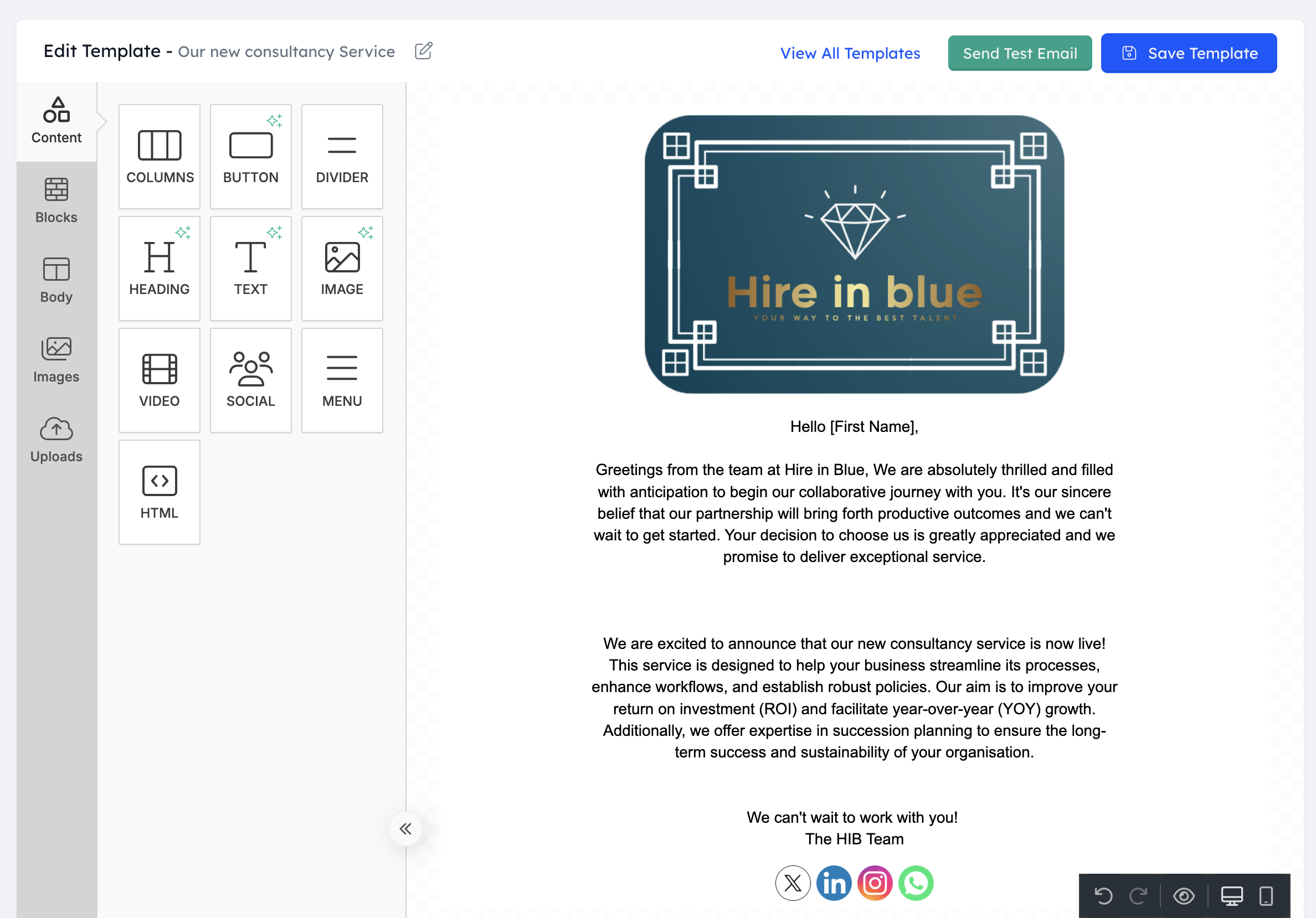
Email remains a critical communication channel for recruitment professionals. Recruitly's AI-enhanced Email Template Designer transforms how agencies create, optimise, and personalize their email communications.
Visual Template Builder
Create professional email templates without technical skills using our intuitive drag-and-drop designer. Easily build sophisticated layouts with dynamic content blocks, personalisation fields, conditional sections, and mobile-responsive design - all through a user-friendly visual interface that produces professional results without HTML knowledge.
AI-Powered Content Suggestions
Develop more effective emails with intelligent content recommendations. Our AI analyzes your objectives, audience, and past performance data to suggest engaging subject lines, compelling introductions, persuasive body content, and effective calls-to-action that improve open rates, response rates, and overall engagement.
Advanced Personalisation Engine
Go beyond basic merge fields with sophisticated dynamic content capabilities. Create emails that automatically adapt based on recipient attributes, relationship history, behavioral patterns, and contextual factors - delivering truly individualized communications that feel personally crafted rather than mass-produced.
Recruitment-Specific Templates
Start quickly with specialised templates designed specifically for recruitment needs. Choose from dozens of pre-built designs for candidate outreach, job alerts, interview scheduling, offer communications, client updates, and other common recruitment scenarios - saving time while implementing proven communication frameworks.
Performance Optimisation
Continuously improve your email effectiveness with built-in analytics and testing capabilities. The system tracks engagement metrics, compares variant performance, and provides actionable recommendations for improvement - helping you refine your approach based on real-world results rather than guesswork.
Brand Consistency Controls
Maintain professional standards with centralized branding controls. Define and apply consistent visual elements, approved messaging components, and communication guidelines across all templates - ensuring every team member creates on-brand communications while allowing appropriate customization for specific needs.
Use cases
Candidate Outreach
Create compelling initial outreach and nurturing email sequences that attract passive candidates with personalised, relevant messaging.
Job Notifications
Design engaging job alert templates that present opportunities with dynamic content personalised to candidate preferences and qualifications.
Interview Communications
Develop professional interview invitation, confirmation, preparation, and follow-up templates that create a consistent candidate experience.
Client Updates
Build informative, branded client communication templates for providing updates, submitting candidates, and delivering project status reports.
Offer Management
Create comprehensive offer communication templates with dynamic sections that adapt based on position type, compensation structure, and candidate status.
Questions
Recruitly's AI enhances email template creation in multiple ways. It suggests effective subject lines based on your specific goals and recipient characteristics. It recommends content structure and messaging approaches proven to drive engagement in recruitment contexts. It helps optimise language for tone, clarity, and persuasiveness. It suggests personalisation strategies based on available recipient data. The AI also analyzes performance data from previous sends to recommend improvements for future iterations. These capabilities combine to produce more effective templates while reducing creation time significantly.
Yes, Recruitly's templates support sophisticated dynamic content capabilities. Beyond basic personalisation fields (name, company, etc.), templates can include conditional sections that display or hide based on recipient attributes like job function, experience level, or relationship stage. Content can adapt based on behavioral data such as previous engagement patterns or application status. Templates can even select different messaging approaches, examples, or design elements based on recipient industry, career level, or other segmentation criteria, creating truly individualized communications at scale.
Absolutely. All templates created with our designer are fully responsive and optimised for mobile viewing. The system automatically adjusts layouts, image sizes, button dimensions, and text formatting to ensure excellent readability and usability across devices. Each template is tested against modern email clients on multiple screen sizes during the creation process. The preview function allows you to see exactly how templates will appear on desktop, tablet, and mobile devices before sending, and the system provides alerts if any elements might cause display issues on specific platforms.
Recruitly provides comprehensive brand controls for email templates. Administrators can define approved color palettes, typography, logo usage, and visual elements that become available in the template editor. You can create locked brand components, standardized headers/footers, and approved content blocks that team members can use but not modify. Templates can be categorized as fully editable, partially restricted, or locked based on sensitivity. The system also supports approval workflows for new templates or modifications to ensure all communications meet brand standards before use.
Yes, the system provides detailed performance analytics for all email templates. You can track open rates, click-through rates, response rates, and conversion metrics for each template and template variation. The analytics engine identifies performance patterns across different audience segments and usage contexts, highlighting which templates work best for specific purposes or recipient types. A/B testing capabilities allow you to systematically compare alternative approaches, and the system provides specific recommendations for improving underperforming templates based on successful patterns.
Key benefits
Create professional, branded emails without technical skills
Improve response rates with AI-optimised content
Save time with ready-to-use recruitment-specific templates
Deliver personalised experiences that increase engagement
Maintain consistent brand presentation across your team
Test and refine templates based on performance data
Ensure mobile-friendly communications for all recipients
Centralize approved messaging for team-wide consistency
React quickly to changing needs with flexible template editing
Reduce administrative time spent on routine communications
How it works
Drag-and-Drop Editor
Create sophisticated email templates using an intuitive visual interface with no technical skills required.
AI Content Assistance
Receive intelligent suggestions for subject lines, content structure, and messaging based on goals and engagement data.
Dynamic Personalisation
Implement advanced personalisation that adapts content based on recipient attributes and relationship context.
Recruitment Templates
Access pre-built templates designed specifically for common recruitment communication scenarios and workflows.
Performance Analytics
Track engagement metrics and test variant performance to continuously refine and improve email effectiveness.
Brand Controls
Maintain consistency with centralized branding elements, messaging guidelines, and approved content components.
See Email Template Designer with AI on your own data
Start free and try it, or have someone walk you through it on a call.
Best Value & Best Ease of Use · Capterra 2026